Features
Your schedule, your structure
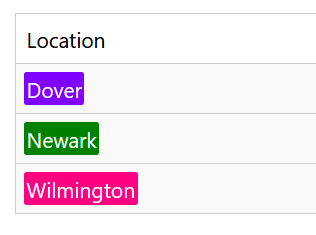
Create your own categories - like Position (Barista, Server, Security), Location (Downtown, Warehouse, Main Stage), Skill (First Aid, Forklift, Cash Handling) - and schedule in a way that speaks your language. Fully configurable, fits any team. Each option gets its own color, making your schedule instantly visual.
Match people to what they can do
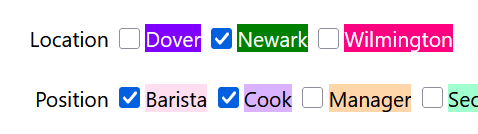
Each team member can be assigned any combination of options - Position, Location, Skill, whatever categories you've set up. So when it's time to schedule, you always know who's available and qualified.
Your calendar layout
Choose what goes in rows and columns, what shift details appear in each cell, which days of the week to show, and what date range to display. The schedule display adapts to how you think, not the other way around.
Sample layouts
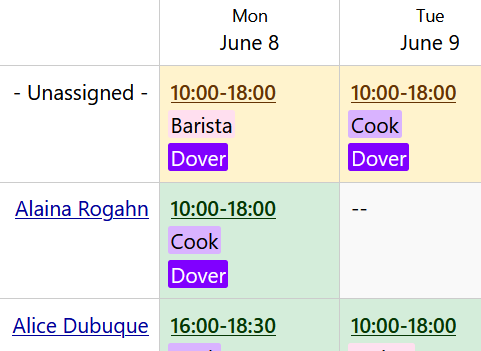
Classic weekly view with rows by employee and full shift details in the cells.
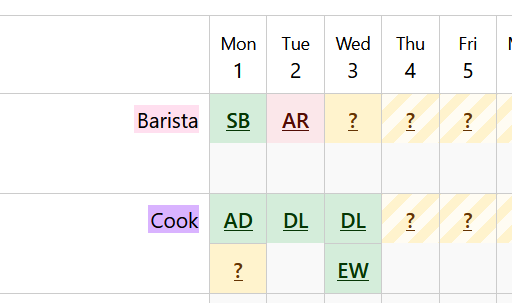
Compact view with rows by positions, columns by dates and employees' initials in the cells.
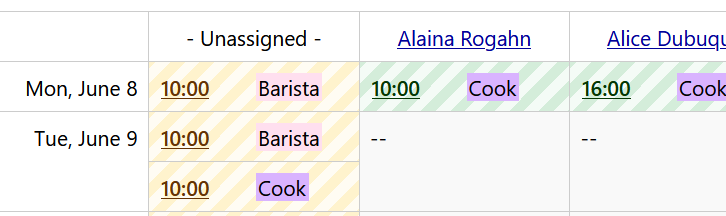
Columns by employees, rows by dates. Shift start time and position on one line. Scroll horizontally to scan multiple days without losing context.
Catch conflicts before they happen
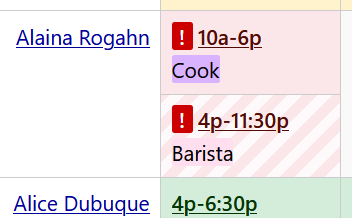
Overlapping shifts or time off are flagged automatically and highlighted in the schedule view. Spot and fix any issue before it reaches your team.
Fill shifts with confidence
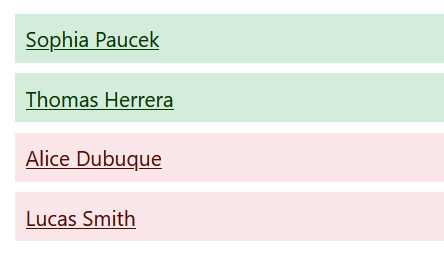
Suitable employees are sorted to the top when assigning or changing a shift. Those who would cause a conflict appear at the bottom, clearly marked in red. The right choice is always obvious.
Connect to anything
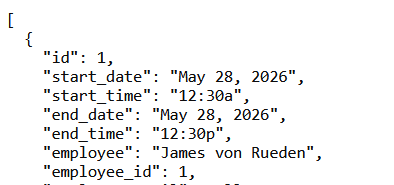
Generate links for JSON, CSV, or iCal and plug your schedule into the tools you already use. Drop the iCal link into Google Calendar, Outlook, or any calendar app and shifts show up automatically - always up to date.
Stay in the loop
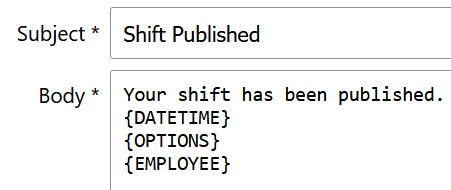
Automatic email notifications keep managers and employees informed on every shift change. Set up daily, weekly, or monthly reminders so employees always know their upcoming schedule - no chasing, no surprises.